
最近接入流式接口,服务端任务还在跑,页面却没有变化,有时直到最后才一下出现整段内容。接入时调整过代理缓冲和超时,也在测试环境验证过。相同的表象仍可能来自不同位置,不能看到卡顿就归给模型。
排查要找到数据经过各层的时间:上游产出、应用写出、代理转发、浏览器解析和界面更新。最终响应正确,只能说明内容最后到了,不能说明中间没有等待。
测试源提供稳定的产出节奏
真实模型首次输出有波动,工具调用也会造成停顿,不适合用来判断代理是否逐条转发。测试接口每秒发一条带序号的事件,最后发送 completed,输出节奏就可预期了。
# 保存为 /tmp/stream-demo.py,运行 python3 /tmp/stream-demo.py
from http.server import BaseHTTPRequestHandler, ThreadingHTTPServer
import json, time

class Handler(BaseHTTPRequestHandler):
    protocol_version = "HTTP/1.1"
    def do_GET(self):
        self.send_response(200)
        self.send_header("Content-Type", "text/event-stream; charset=utf-8")
        self.send_header("Cache-Control", "no-cache")
        self.send_header("X-Accel-Buffering", "no")
        self.send_header("Connection", "close")
        self.end_headers()
        self.close_connection = True
        try:
            for seq in range(1, 4):
                payload = json.dumps({"seq": seq}, ensure_ascii=False)
                self.wfile.write(
                    f"id: {seq}\nevent: progress\ndata: {payload}\n\n".encode()
                )
                self.wfile.flush()
                time.sleep(1)
            self.wfile.write(b"event: completed\ndata: {}\n\n")
            self.wfile.flush()
        except (BrokenPipeError, ConnectionResetError):
            pass

ThreadingHTTPServer(("127.0.0.1", 9090), Handler).serve_forever()
这是诊断服务,没有认证、持久化与任务管理。flush 只是把应用缓冲提交给下层,不保证代理或浏览器已处理。
# -N 关闭命令行客户端自己的输出缓冲
curl -N --trace-time --trace-ascii /tmp/stream-direct.trace http://127.0.0.1:9090/
curl -N --trace-time --trace-ascii /tmp/stream-proxy.trace http://127.0.0.1:8080/api/events
命令行客户端使用 -N,避免自己的输出缓冲干扰观察。对固定测试源,两次请求顺序执行即可;真实模型调用则要关联同一请求的各层记录,不能把两次生成时差算成代理开销。
到达时间能缩小排查范围
| 现象 | 检查位置 |
|---|---|
| 直连也是结束时一起出现 | 上游是否一次返回、应用是否读完才写 |
| 直连逐条,代理后成批 | 各层响应缓冲、压缩与中间件 |
| 浏览器收到字节,事件未触发 | 空行、事件名、字符解码与残留缓冲 |
| 事件回调正常,文字不更新 | 前端合并缓冲、状态更新与渲染阻塞 |
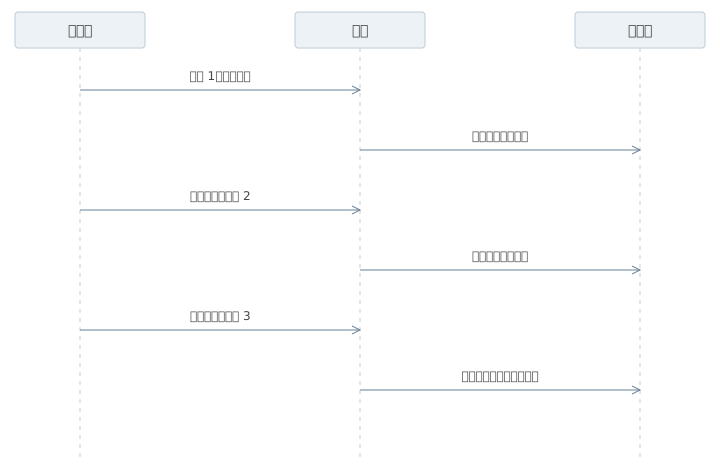
记录请求标识、序号、字节数与时间就能帮助比较,不必输出整段业务数据。跨机器时钟未校准时,比较各自的相邻间隔和事件顺序,不直接相减得到延迟。
流式 location 不沿用普通响应的缓冲假设
location = /api/events {
    proxy_pass http://127.0.0.1:9090/;
    proxy_http_version 1.1;
    proxy_set_header Connection "";
    proxy_buffering off;
    proxy_cache off;
    gzip off;
    proxy_read_timeout 30s;
}
proxy_buffering 控制响应,proxy_request_buffering 控制请求体,二者不同。proxy_read_timeout 是相邻上游读取的等待预算,不是整个任务时长。示例的 30 秒只是测试值,业务总执行时间另行限制。
应用返回 X-Accel-Buffering: no 也可能改变行为,但要确认代理没有忽略它。外面还有代理,就逐层比较。心跳维持连接活动,不代表任务还在有效推进。
关闭缓冲会使慢客户端的连接保留更久,需要限制订阅发送队列。落后太多时断开,由重放或状态快照恢复,不能无限积累未发送内容。
字符解码与事件解析处理不同边界
一次 read 可能只有半个汉字,也可能含有几条事件。支持 POST 或自定义请求头的接口,可以采用 fetch,保留未完成的字符和事件缓冲。
async function consume(response, onEvent) {
  if (!response.ok) throw new Error(`HTTP ${response.status}`);
  const type = response.headers.get("content-type") || "";
  if (!type.includes("text/event-stream")) throw new Error("unexpected type");
  if (!response.body) throw new Error("missing body");
  const reader = response.body.getReader();
  const decoder = new TextDecoder();
  let pending = "", terminal = false;
  try {
    while (true) {
      const {value, done} = await reader.read();
      pending += done ? decoder.decode() : decoder.decode(value, {stream: true});
      let end;
      while ((end = pending.indexOf("\n\n")) >= 0) {
        const frame = pending.slice(0, end);
        pending = pending.slice(end + 2);
        let name = "message", data = [];
        for (const line of frame.split("\n")) {
          if (line.startsWith("event:")) name = line.slice(6).trimStart();
          if (line.startsWith("data:")) data.push(line.slice(5).replace(/^ /, ""));
        }
        if (!data.length) continue; // 注释心跳没有 data
        const payload = JSON.parse(data.join("\n"));
        onEvent(name, payload);
        if (name === "completed" || name === "failed") terminal = true;
      }
      if (terminal) break;
      if (pending.length > 1024 * 1024) throw new Error("frame too large");
      if (done) break;
    }
    if (!terminal) throw new Error("stream ended without terminal event");
  } finally {
    try { await reader.cancel(); } finally { reader.releaseLock(); }
  }
}
这个解析器限定服务端使用 LF 换行,业务事件的 data 约定为 JSON,处理跨块字符、多行 data 和同块多事件。纯文本数据需要采用对应解码方式。任意合规 SSE 还涉及 CRLF、单独 CR、BOM 与 retry 等规则,通用接入应采用覆盖这些规则的解析实现。
前端可以合并短文本到下一帧刷新,减少重复渲染,但不能只等 completed 才更新。无终态的 EOF 记录为结果未知,由上层查询任务;取消读取只停止接收,后台执行由取消接口和运行时处理。
断线后恢复的是任务状态
长任务创建后返回 taskId,事件使用任务内递增 seq,终态另有查询接口。订阅断开是否停止任务,由产品规则决定。
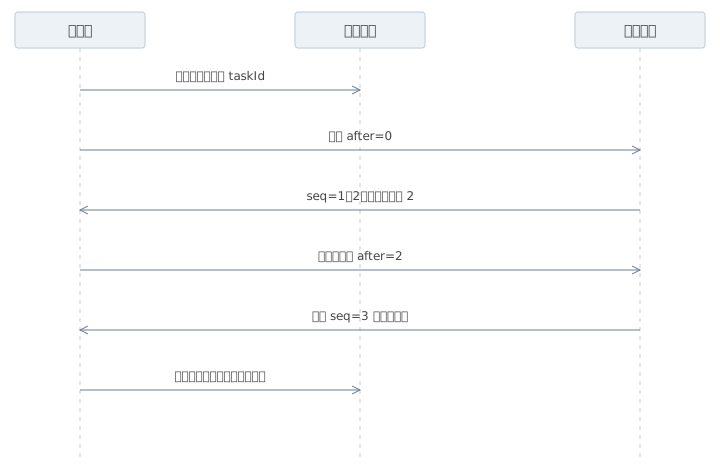
客户端报告已处理游标,服务端在保留窗口重放,重复 seq 不再追加。游标过期则返回需要全量同步,读取快照恢复。原生 EventSource 有 Last-Event-ID 机制,服务端仍需实现实际存储与重放。
验证覆盖稳定事件间距、单字节分块还原中文、同块多事件、断线去重与终态缺失。连接传得及时、事件拆得正确、任务状态可核对,这几项共同决定页面的流式体验。